Remote work is full of colleagues we know well and people we barely know at all. You see the same faces in the same meetings, and somehow nobody ever finds out that two of you grew up in the same town, or that the quiet one in the corner once cycled across a continent. The context that used to leak out around the kettle has nowhere to leak.
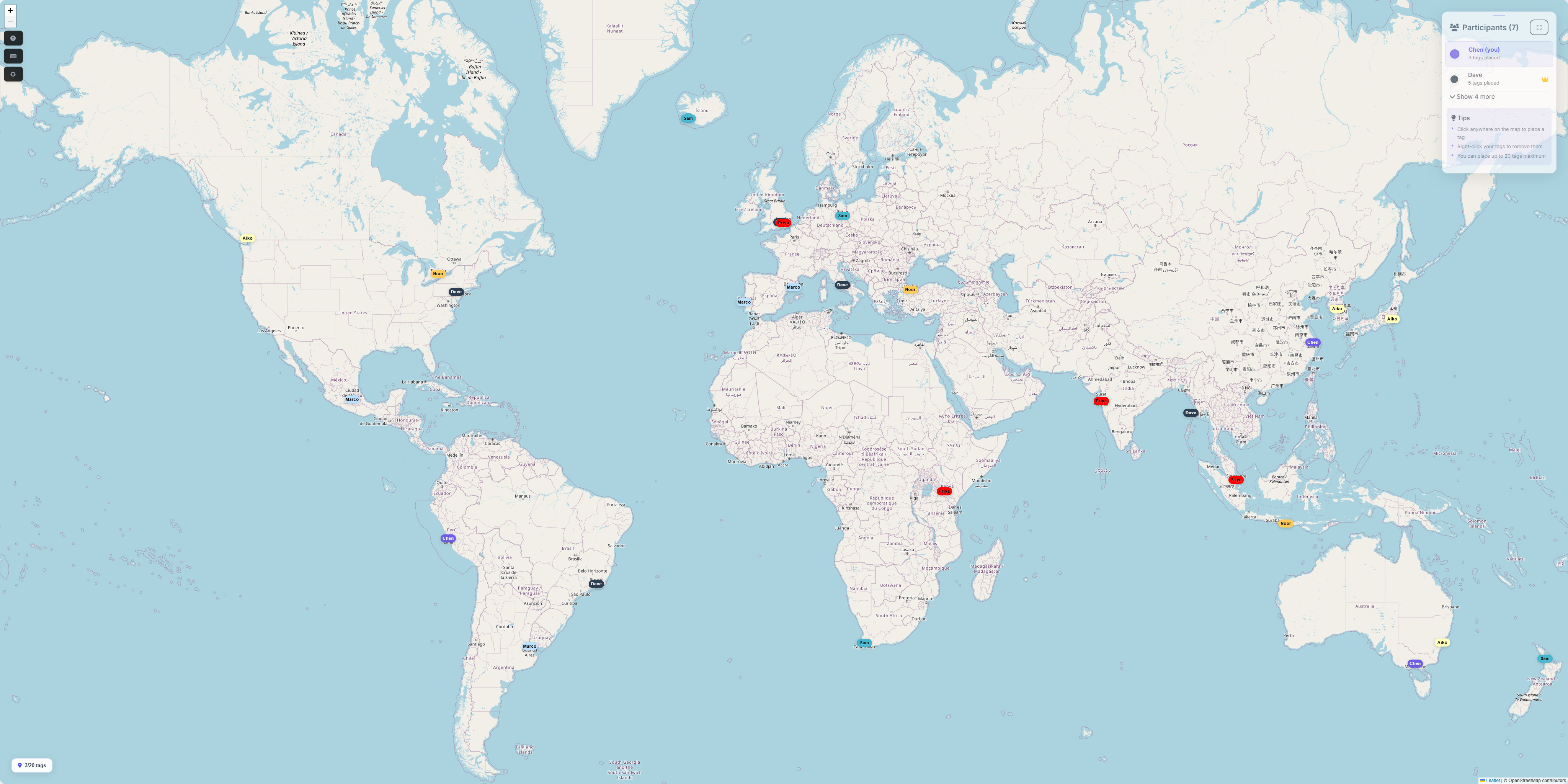
Tag The Map gives a distributed team one shared world map and twenty minutes of everyone pinning the places they have lived, travelled and called home. It runs in the browser, updates live for everyone at once, and nobody has to install anything or create an account to take part.
Why a map works where "fun facts" fail
Most remote icebreakers ask people to perform: think of something interesting about yourself, say it to a grid of faces, wait for the next person. A map quietly removes the performance. Everyone is looking at the same thing, not at each other, and the question is concrete: where have you been? Pins appear, clusters form, and the conversation starts itself. "Who is the pin in Mongolia?" is a better opener than any prompt card.
It also flattens the room. The newest starter has been somewhere nobody else has. The person who never speaks first can drop a pin without unmuting. Stories surface because someone asks, not because a facilitator called on you.
How to run it
- Create a session. Sign in, create a session from your dashboard, and you get a short code to share.
- Share the code in your team chat. Participants open the join page, enter the code, pick a display name and a colour, and they are on the map. No accounts, no downloads.
- Give it a frame. "Pin the places that mean something to you: where you grew up, somewhere you loved, somewhere that surprised you." Three pins each is a good start.
- Talk about what appears. Ask about the outliers, the clusters and the overlaps. Let people tell the story behind a pin if they want to, and move on if they do not.
- Close with the count. The map totals the countries your group has been to between you. It is nearly always a bigger number than anyone guesses, and it lands as a fact about the team rather than about any one person.
Tips from sessions that went well
- Do it on a call, not asynchronously. The live part is the point: pins appearing in real time is what makes people react.
- Pin first, talk second. Give two or three quiet minutes for pinning before anyone speaks. It gives slower joiners cover and the map something to show.
- Nobody has to explain a pin. Make that explicit at the start. A pin with no story attached is still a pin on the team's map.
- Initials are fine. Display names are chosen freely, so people who prefer to stay low key can be. Participants are anonymous beyond the name they pick.
- Keep the map open. A host can close a session to new pins but leave it viewable, so the map can hang around in a channel after the call as a small shared artefact.
When to reach for it
The obvious moments are the ones where a team is newly formed or newly merged. The less obvious ones are often better: the first call after a stressful release, the all-hands that needs ten warm minutes before the roadmap, the Friday session nobody had planned anything for. It needs almost no preparation, which is exactly what makes it usable on a Tuesday.
Put your team on the map
Hosting takes a couple of minutes to set up, and joining takes seconds.
Host a session Join a session